 Etherdrake
8.2 KiB
Documentation Index
Fetch the complete documentation index at: https://docs.polymarket.com/llms.txt Use this file to discover all available pages before exploring further.
Order Lifecycle
Understanding how orders flow from creation to settlement
Every trade on Polymarket follows a specific lifecycle. Orders are created offchain, matched by an operator, and settled onchain through smart contracts. This hybrid approach combines the speed of centralized matching with the security of blockchain settlement.
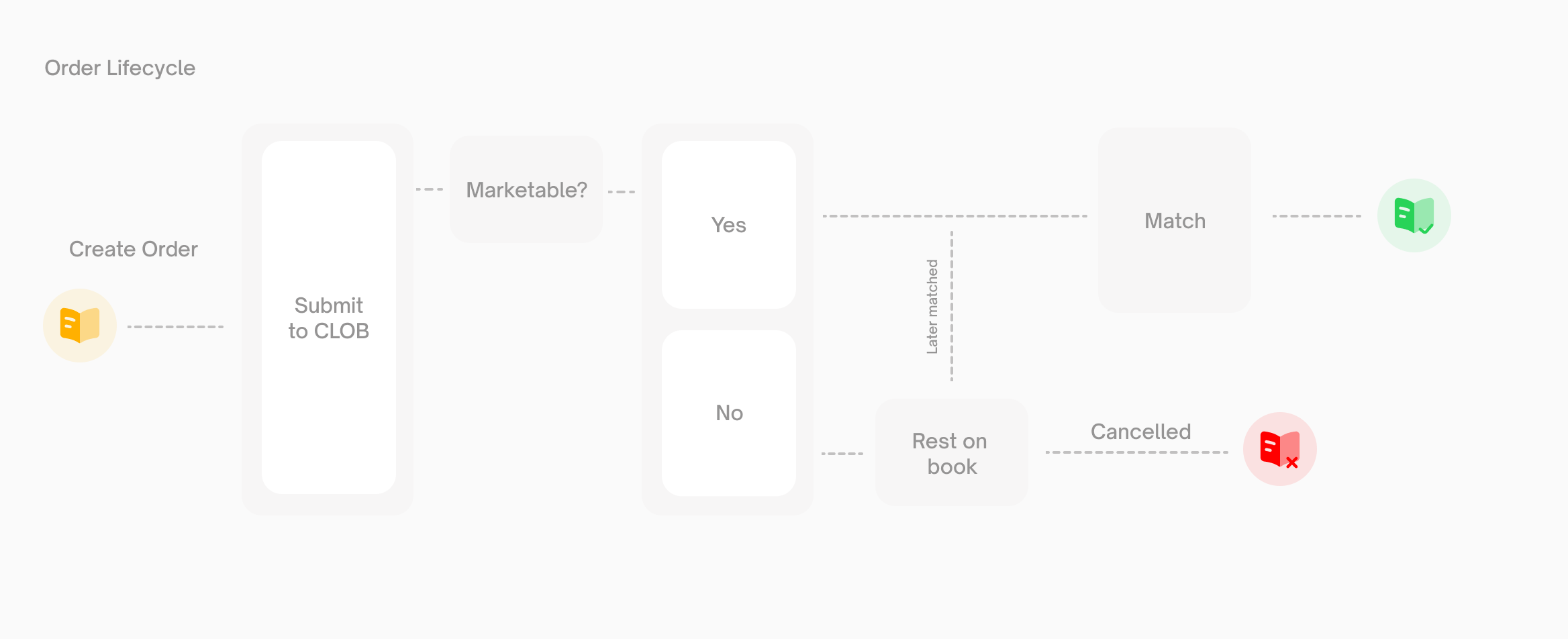
How Orders Work
All orders on Polymarket are limit orders. A limit order specifies the price you're willing to pay (or accept) and the quantity you want to trade.
"Market orders" are simply limit orders with a price set to execute immediately against the best available resting orders.Orders are EIP712-signed messages. When you place an order, you sign a structured message with your private key. This signature authorizes the Exchange contract to execute the trade on your behalf—without ever taking custody of your funds.
Order Types
| Type | Behavior | Use Case |
|---|---|---|
| GTC | Good Till Cancelled — rests on book until filled or cancelled | Standard limit orders |
| GTD | Good Till Date — auto-expires at specified time | Time-limited orders |
| FOK | Fill Or Kill — fill entirely or cancel immediately | All-or-nothing execution |
| FAK | Fill And Kill — fill what's available, cancel the rest | Partial fills acceptable |
Post-Only Orders
Post-only orders will only rest on the book. If a post-only order would match immediately (cross the spread), it's rejected instead of executed. This guarantees you're always the maker, never the taker.
Your client creates an order object containing:* Token ID (which outcome you're trading)
* Side (buy or sell)
* Price and size
* Expiration time
* Timestamp (in milliseconds, used for order uniqueness)
You sign this order with your private key, creating an EIP712 signature.
* Signature is valid
* You have sufficient balance
* You have set the required allowances
* Price meets minimum tick size requirements
* **Taker delay:** used on selected crypto and finance up/down markets. The order is held for 250 ms, then validation runs again and the order is matched or placed on the book. The API waits for this hold and returns the final order result. To check a specific market, call the public CLOB endpoint `GET https://clob.polymarket.com/clob-markets/{condition_id}` or SDK method `getClobMarketInfo(conditionID)` and look for `itode: true`.
* **Sports/game delay:** enabled on configured sports markets around live game conditions. The order waits for the market's configured delay window before matching.

During either delay, the order is pending and cannot be canceled. If the market, balance, allowance, or risk checks fail when the delay expires, the order is rejected instead of matching.

**If the order is not marketable**, it rests on the book waiting for a counterparty. It remains open until:

* Another order matches against it
* You cancel it
* It expires (GTD orders only)
* Verifies both signatures
* Transfers tokens from seller to buyer
* Transfers pUSD from buyer to seller

Settlement is **atomic**—either the entire trade succeeds or nothing happens.
Order Statuses
When you place an order, it receives one of these statuses:
| Status | Description |
|---|---|
live |
Order is resting on the book |
matched |
Order matched immediately |
delayed |
Marketable order accepted into an asynchronous delay window on configured seconds-delay markets, such as sports markets |
unmatched |
Marketable order placed on the book after the delay expired without a match |
Trade Statuses
After matching, trades progress through these statuses:
| Status | Terminal | Description |
|---|---|---|
MATCHED |
No | Trade matched, sent to executor for onchain submission |
MINED |
No | Transaction mined into the blockchain |
CONFIRMED |
Yes | Trade achieved finality, successful |
RETRYING |
No | Transaction failed, being retried |
FAILED |
Yes | Trade failed permanently |
Maker vs Taker
| Role | Description | When |
|---|---|---|
| Maker | Adds liquidity to the book | Your order rests and is later matched |
| Taker | Removes liquidity from the book | Your order matches immediately against resting orders |
Price improvement always benefits the taker. If you place a buy order at $0.55 and it matches against a resting sell at $0.52, you pay $0.52.
Cancellation
You can cancel orders at any time before they're matched via the CLOB API, except while a marketable order is in a pending delay window.
Partial fills cannot be cancelled—only the unfilled portion of an order can be cancelled.
Requirements
Before placing orders, ensure:
| Requirement | Description |
|---|---|
| Balance | Sufficient pUSD (for buys) or tokens (for sells) |
| Allowance | Approve the Exchange contract to spend your assets |
| API Credentials | Valid API key for authenticated endpoints |
\text{maxOrderSize} = \text{balance} - \sum(\text{openOrderSize} - \text{filledAmount})