 Etherdrake
9.4 KiB
Documentation Index
Fetch the complete documentation index at: https://docs.polymarket.com/llms.txt Use this file to discover all available pages before exploring further.
Builder Fees
How builders earn fees on orders routed through their applications, and how to integrate.
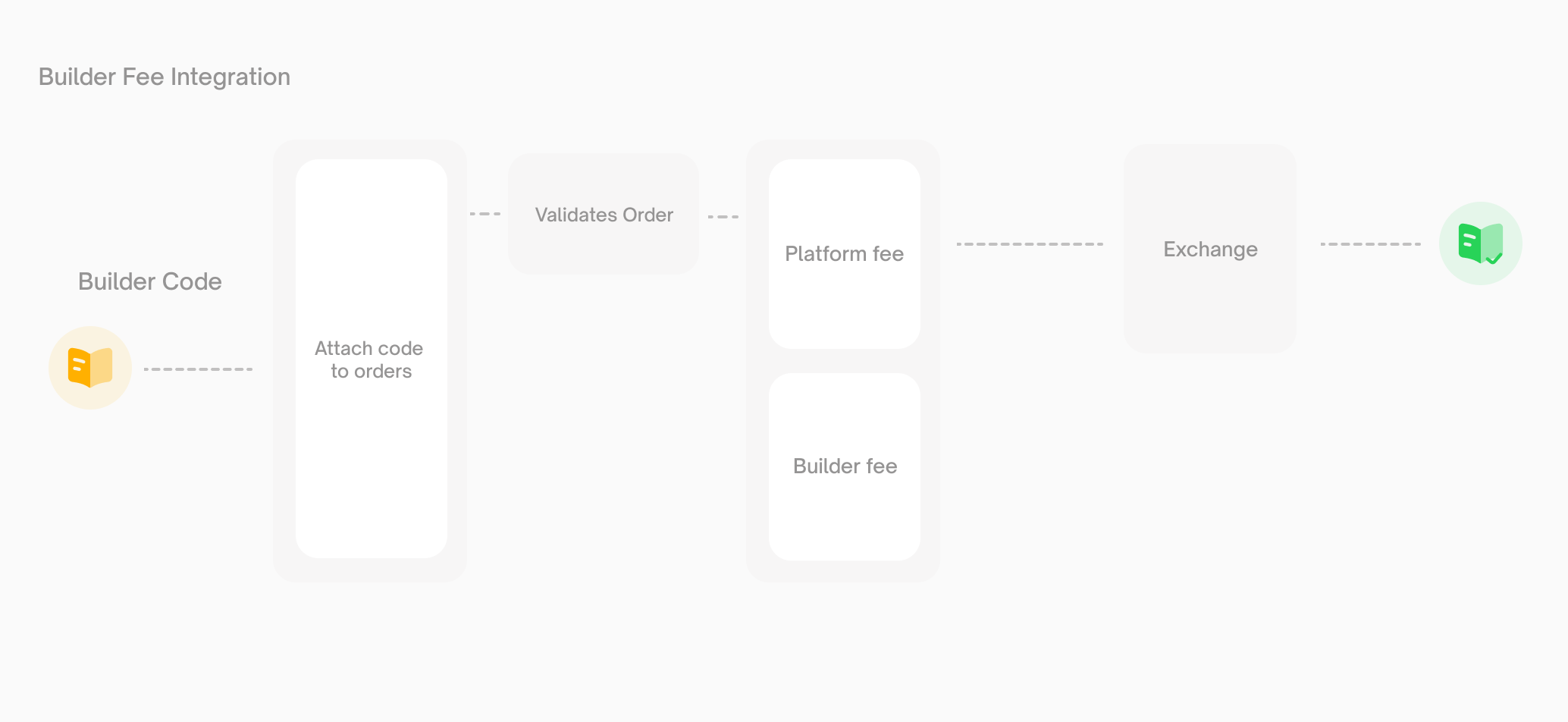
CLOB V2 introduces a fee layer that lets builders earn a fee on every order routed through their application. When a builder attaches their unique builder code to an order and that order matches, a builder fee is collected alongside any platform fee.
Builder fees are flat percentages of trade notional, configured by each builder within enforced limits. They're additive — they stack on top of platform fees, never replace them.
New to the Builder Program? Start with [Builder Program](/builders/overview). This page covers the fee layer specifically.How it works
Builder fees and platform fees are independent. What the user pays depends on the market config and whether a builder code is attached:
| Market | Builder code attached | User pays |
|---|---|---|
| No platform fee | No | Nothing |
| No platform fee | Yes | Builder fee only |
| Platform fee enabled | No | Platform fee only |
| Platform fee enabled | Yes | Platform fee + builder fee |
Builder fees never replace platform fees — they're always additive.
Polymarket reserves the right to revoke your ability to charge a builder fee in its sole discretion, for any reason or no reason, including but not limited to instances where fees are determined to have been collected through fraudulent, deceptive, misleading, automated, self-referred, or other non-bona fide trading activity.Registration
Register for a builder code through your Polymarket account.
Go to [polymarket.com/settings?tab=builder](https://polymarket.com/settings?tab=builder) and set up your builder profile. Configure two rates on your profile:* `builder_taker_fee_bps` — charged on taker orders routed through your app
* `builder_maker_fee_bps` — charged on maker orders routed through your app
Fee rate limits
| Parameter | Default | Maximum |
|---|---|---|
| Taker fee rate | 0 bps (0%) | 100 bps (1%) |
| Maker fee rate | 0 bps (0%) | 50 bps (0.5%) |
| Granularity | — | 1 bp (0.01%) |
Rate change policy
Fee rate changes are gated so users can see them coming:
- Cooldown. One rate change per 7 days.
- Advance notice. Changes take effect 3 days after being scheduled.
- One pending change at a time. You can't queue multiple changes — wait for the current one to take effect (or cancel it) before scheduling another.
SDK integration
The V2 SDK handles builder codes natively — no separate signing library, no extra headers.
Install
```bash TypeScript theme={null} npm install @polymarket/clob-client-v2 viem ```pip install py-clob-client-v2
Attach your builder code
Pass builderCode on every order your application submits. This is how trades are attributed to your profile.
Limit order:
const response = await client.createAndPostOrder(
  {
    tokenID: "0x123...",
    price: 0.55,
    size: 100,
    side: Side.BUY,
    expiration: 1714000000,
    builderCode: process.env.POLY_BUILDER_CODE,
  },
  { tickSize: "0.01", negRisk: false },
  OrderType.GTC,
);
Market order:
const response = await client.createAndPostMarketOrder(
  {
    tokenID: "0x123...",
    side: Side.BUY,
    amount: 500,
    price: 0.5, // worst-price limit (slippage protection)
    userUSDCBalance: 1000, // optional — enables fee-aware fill calculations
    builderCode: process.env.POLY_BUILDER_CODE,
  },
  { tickSize: "0.01", negRisk: false },
  OrderType.FOK,
);
If builderCode is omitted, no builder fee is charged.
Query fee parameters
getClobMarketInfo() returns both platform and builder fee parameters for a market:
const info = await client.getClobMarketInfo(conditionID);

// Platform fee
// info.fd.r   — fee rate
// info.fd.e   — fee exponent
// info.fd.to  — taker-only flag

// Builder fee
// info.mbf    — builder maker fee rate
// info.tbf    — builder taker fee rate
Fee calculation
Platform fees
Platform fees use a dynamic per-market formula:
platform_fee = C × feeRate × p × (1 - p)
Where C is the trade size, p is the order price, and feeRate is a per-market parameter. Platform fees are currently taker-only and are not configurable by builders.
Builder fees
Builder fees are a flat percentage of notional:
builder_fee = notional × builder_fee_rate_bps / 10000
Example. A 1,000 pUSD taker buy routed through a builder charging 100 bps (1%) taker fee:
builder_fee = 1000 × 100 / 10000 = 10 pUSD
The maker and taker sides of a single trade can have different builder codes and different rates. If Builder A (0.3% maker) posts the resting order and Builder B (0.8% taker) submits the matching order, each earns their respective fee from their respective side.
Balance checks
The CLOB's balance checker accounts for all applicable fees (platform + builder) when validating an order. Users must have enough pUSD to cover the trade plus the maximum possible fees.
For market buy orders, pass userUSDCBalance and the SDK computes fee-adjusted fill amounts automatically.
Onchain attribution
Builder attribution is part of the signed V2 order struct — not an offchain label. The builder field appears in every OrderFilled event emitted by the CTF Exchange V2 contract.
V2 order struct
salt, maker, signer, tokenId, makerAmount, takerAmount,
side, signatureType, timestamp, metadata, builder
The builder field is a bytes32 matching your registered builder code.
EIP-712 domain
The Exchange domain version is "2" in V2 (up from "1"). If you construct EIP-712 typed data manually rather than via the SDK, update your domain separator — see For API users in the migration guide.
Fee processing and payouts
When a user places an order with your builderCode attached:
- The CLOB validates the order and the builder code.
- At match time, the Fees Service computes the platform and builder fees for each side.
- The trade settles onchain via
CTFExchangeV2.matchOrders(), emittingOrderFilledevents. - The Builders Service indexes those events, joins onchain attribution with your builder profile, and accrues your earned fees.
Collected builder fees are distributed to the wallet associated with your builder profile.
Program policies
Disabled codes
Polymarket may disable a builder code at any time — for violations of the Builder Program terms, abusive fee practices, or platform integrity concerns. Orders carrying a disabled code will be rejected by the CLOB.
Public visibility
Builder profiles and fee rates are publicly queryable. This is intentional — it lets users and third parties see what a builder charges before using their app.
Existing builders
Builders with V1 integrations have builder code entities provisioned automatically. No action is required beyond upgrading to the V2 SDK and attaching your builder code to orders. See Migrating to CLOB V2 for the full upgrade path.