> ## Documentation Index
> Fetch the complete documentation index at: https://docs.polymarket.com/llms.txt
> Use this file to discover all available pages before exploring further.
# Builder Profile & Keys
> Learn how to access your builder profile and obtain API credentials
## Accessing Your Builder Profile
Go to [polymarket.com/settings?tab=builder](https://polymarket.com/settings?tab=builder)
Click your profile image and Select "Builders"
***
## Builder Profile Settings
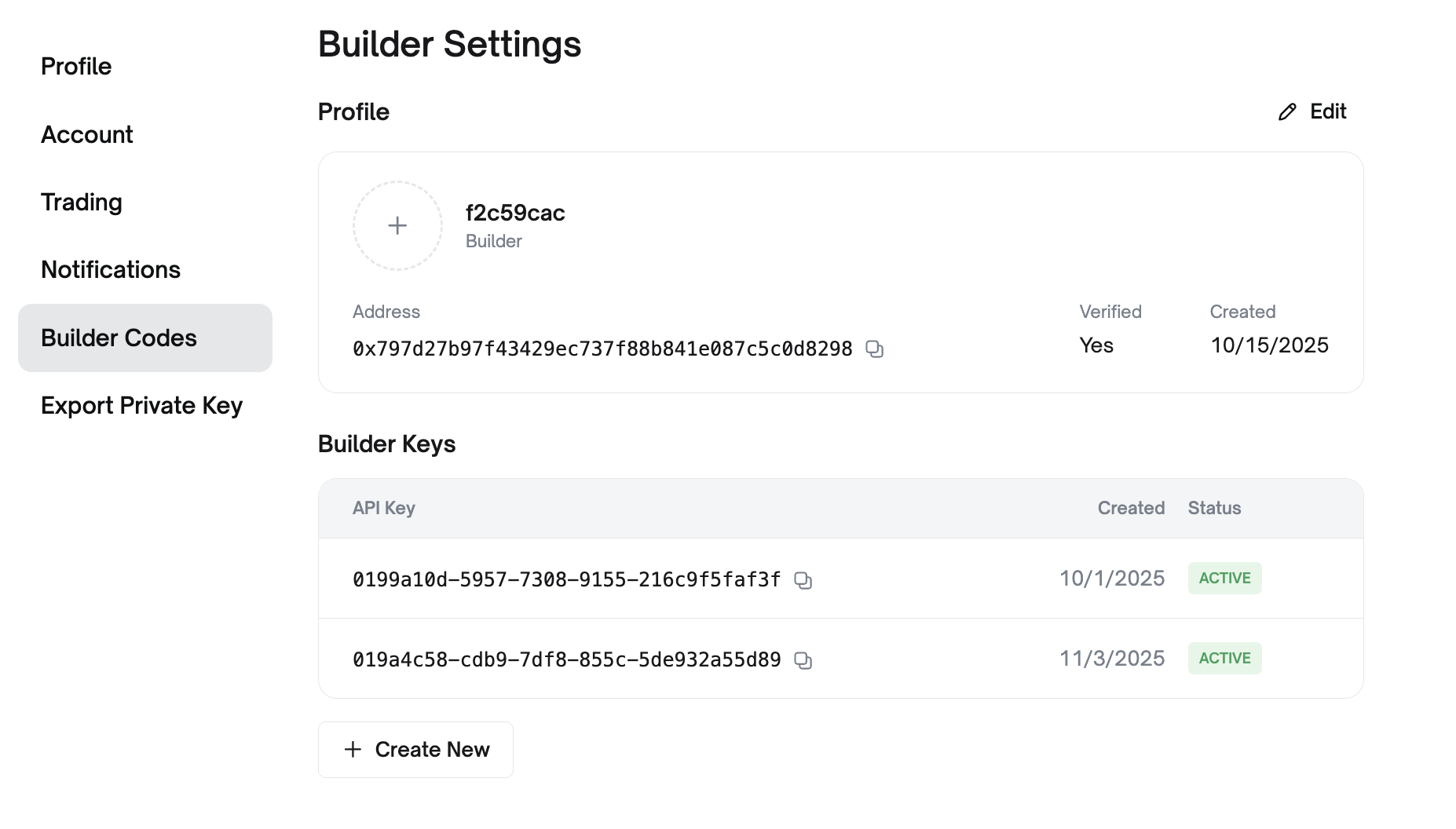 ### Customize Your Builder Identity
* **Profile Picture**: Upload a custom image for the [Builder Leaderboard](https://builders.polymarket.com/)
* **Builder Name**: Set the name displayed publicly on the leaderboard
### View Your Builder Information
* **Builder Address**: Your unique builder address for identification
* **Creation Date**: When your builder account was created
* **Current Tier**: Your rate limit tier (Unverified or Verified)
***
## Builder API Keys
Builder API keys are required to access the relayer and for CLOB order attribution.
### Creating API Keys
In the **Builder Keys** section of your profile's **Builder Settings**:
1. View existing API keys with their creation dates and status
2. Click **"+ Create New"** to generate a new API key
Each API key includes:
| Credential | Description |
| ------------ | ------------------------------------ |
| `apiKey` | Your builder API key identifier |
| `secret` | Secret key for signing requests |
| `passphrase` | Additional authentication passphrase |
### Managing API Keys
* **Multiple Keys**: Create separate keys for different environments
* **Active Status**: Keys show "ACTIVE" when operational
***
## Next Steps
Start attributing customer orders to your account
View your public profile and stats
### Customize Your Builder Identity
* **Profile Picture**: Upload a custom image for the [Builder Leaderboard](https://builders.polymarket.com/)
* **Builder Name**: Set the name displayed publicly on the leaderboard
### View Your Builder Information
* **Builder Address**: Your unique builder address for identification
* **Creation Date**: When your builder account was created
* **Current Tier**: Your rate limit tier (Unverified or Verified)
***
## Builder API Keys
Builder API keys are required to access the relayer and for CLOB order attribution.
### Creating API Keys
In the **Builder Keys** section of your profile's **Builder Settings**:
1. View existing API keys with their creation dates and status
2. Click **"+ Create New"** to generate a new API key
Each API key includes:
| Credential | Description |
| ------------ | ------------------------------------ |
| `apiKey` | Your builder API key identifier |
| `secret` | Secret key for signing requests |
| `passphrase` | Additional authentication passphrase |
### Managing API Keys
* **Multiple Keys**: Create separate keys for different environments
* **Active Status**: Keys show "ACTIVE" when operational
***
## Next Steps
Start attributing customer orders to your account
View your public profile and stats