# Predix






AI-powered Quantitative Trading Agent for EUR/USD Forex
Installation •
Quick Start •
Configuration •
Features








---
## 🖥️ CLI Dashboard
```bash
rdagent predix
```
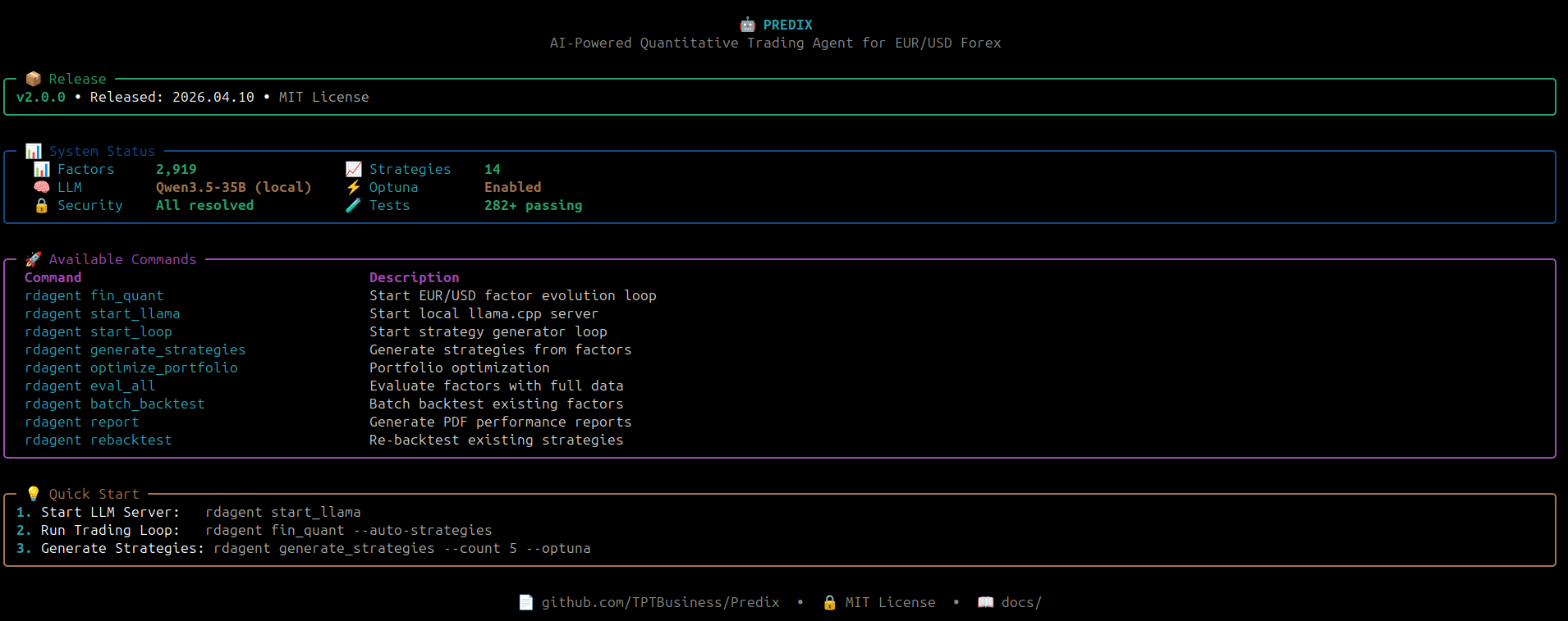
*The Predix CLI shows system status, available commands, and quick start guide.*
---
## Overview
**Predix** is an autonomous AI agent for quantitative trading strategies in the EUR/USD forex market. Built on a multi-agent framework, Predix automates the full research and development cycle:
- 📊 **Data Analysis** – Automatically analyzes market patterns and microstructure
- 💡 **Strategy Discovery** – Proposes novel trading factors and signals
- 🧠 **Model Evolution** – Iteratively improves predictive models
- 📈 **Backtesting** – Validates strategies on historical 1-minute data
Predix is optimized for **1-minute EUR/USD FX data** (2020–2026) and uses Qlib as the underlying backtesting engine.
## Acknowledgments
This project draws inspiration from various open-source projects in the AI trading and multi-agent systems space. We thank all the authors for their innovative work that helped shape our understanding of these patterns.
Special thanks to:
- **[Microsoft RD-Agent](https://github.com/microsoft/RD-Agent)** (MIT License) - Foundation for our autonomous R&D agent framework. We extend our gratitude to the RD-Agent team for their excellent foundational work.
- **[TradingAgents](https://github.com/TauricResearch/TradingAgents)** (Apache 2.0 License) - Inspiration for our multi-agent debate system, reflection mechanism, and memory management modules.
- **[ai-hedge-fund](https://github.com/virattt/ai-hedge-fund)** - Inspiration for macro analysis (Stanley Druckenmiller agent), risk management concepts, and market regime detection.
All code in Predix is originally written and implemented independently. Predix extends these frameworks with EUR/USD forex-specific features, 1-minute backtesting capabilities, comprehensive risk management, and trading dashboards.
---
## Installation
### System Requirements
| Component | Minimum | Recommended |
|-----------|---------|-------------|
| **GPU VRAM** | 8 GB | 16 GB (RTX 4080 / 5060 Ti) |
| **RAM** | 16 GB | 32 GB |
| **Storage** | 20 GB | 50 GB (models + data) |
| **OS** | Linux (Ubuntu 22.04+) | Linux |
| **CUDA** | 12.0+ | 12.4+ |
> Local LLMs require a CUDA-capable GPU. The default model (Qwen3.6-35B Q3) uses ~13.6 GB VRAM. CPU-only inference is possible but very slow (not recommended for production use).
### Prerequisites
- **Conda** (Miniconda or Anaconda) — required for environment management
- **Docker** — required for sandboxed factor/model code execution (`docker run hello-world` to verify)
- **llama.cpp** — for local LLM inference (see [llama.cpp build guide](https://github.com/ggml-org/llama.cpp))
- **Linux** — officially supported; macOS/Windows may work with adjustments
### Quick Install
```bash
# Clone repository
git clone https://github.com/TPTBusiness/Predix
cd Predix
# Create and activate conda environment
conda create -n predix python=3.10 -y
conda activate predix
# Install in editable mode
pip install -e .
# Verify Docker is accessible
docker run --rm hello-world
```
> **Important:** Predix requires a conda environment to manage dependencies properly.
> Using plain Python or other environment managers may cause conflicts.
---
## Data Setup
Predix requires **1-minute EUR/USD OHLCV data** in HDF5 format. This is a hard prerequisite — the system cannot run without it.
### Step 1: Get the data
Download 1-minute EUR/USD data (2020–present) from any of these free sources:
| Source | Cost | Notes |
|--------|------|-------|
| **[Dukascopy](https://www.dukascopy.com/swiss/english/marketfeed/historical/)** | Free | Best quality free EUR/USD tick data |
| **[OANDA API](https://developer.oanda.com/)** | Free (demo) | Requires API key, programmatic access |
| **[TrueFX](https://truefx.com/)** | Free | Institutional-quality tick data |
| **[Kaggle](https://www.kaggle.com/datasets?search=EURUSD+1min)** | Free | Search "EURUSD 1 minute" |
| **MetaTrader 5** | Free | Export via `copy_rates_range()` |
### Step 2: Convert to HDF5
```python
import pandas as pd
df = pd.read_csv('eurusd_1min.csv', parse_dates=['datetime'])
df = df.rename(columns={'open': '$open', 'close': '$close',
'high': '$high', 'low': '$low', 'volume': '$volume'})
df['instrument'] = 'EURUSD'
df = df.set_index(['datetime', 'instrument'])
for col in ['$open', '$close', '$high', '$low', '$volume']:
df[col] = df[col].astype('float32')
import os
os.makedirs('git_ignore_folder/factor_implementation_source_data', exist_ok=True)
df.to_hdf('git_ignore_folder/factor_implementation_source_data/intraday_pv.h5', key='data', mode='w')
```
### Required HDF5 format
| Field | Type | Description |
|-------|------|-------------|
| **Index** | MultiIndex `(datetime, instrument)` | Timestamp + currency pair |
| **`$open`** | float32 | Open price |
| **`$close`** | float32 | Close price |
| **`$high`** | float32 | High price |
| **`$low`** | float32 | Low price |
| **`$volume`** | float32 | Tick volume |
**Save location:** `git_ignore_folder/factor_implementation_source_data/intraday_pv.h5`
---
## Configuration
### Environment Setup
Create a `.env` file in the project root:
```bash
# Local LLM (llama.cpp)
OPENAI_API_KEY=local
OPENAI_API_BASE=http://localhost:8081/v1
CHAT_MODEL=qwen3.5-35b
# Embedding (Ollama)
LITELLM_PROXY_API_KEY=local
LITELLM_PROXY_API_BASE=http://localhost:11434/v1
EMBEDDING_MODEL=nomic-embed-text
# Paths
QLIB_DATA_DIR=~/.qlib/qlib_data/eurusd_1min_data
```
### LLM Server (llama.cpp)
```bash
~/llama.cpp/build/bin/llama-server \
--model ~/models/qwen3.6/Qwen3.6-35B-A3B-UD-Q3_K_XL.gguf \
--n-gpu-layers 24 \
--no-mmap \
--port 8081 \
--ctx-size 240000 \
--parallel 2 \
--batch-size 512 --ubatch-size 512 \
--host 0.0.0.0 \
-ctk q4_0 -ctv q4_0 \
--reasoning off
```
> **Important flags:**
> - `--ctx-size 240000 --parallel 2` — allocates **2 slots × 120,000 tokens each**. `fin_quant` prompts can reach 80k+ tokens with full factor history; a smaller slot causes silent overflow and empty responses.
> - `--reasoning off` — **critical**: completely disables Qwen3 chain-of-thought. `--reasoning-budget 0` is not sufficient and produces empty JSON responses.
> - `--n-gpu-layers 24` — 4 fewer than maximum on RTX 5060 Ti (16 GB), freeing ~500 MB VRAM for the larger KV cache.
> - `-ctk q4_0 -ctv q4_0` — quantises the KV cache to 4-bit, reducing VRAM from ~5 GB to ~1.3 GB at 240k context.
### Data Configuration
Edit [`data_config.yaml`](data_config.yaml) to customize walk-forward splits:
```yaml
instrument: EURUSD
frequency: 1min
data_path: ~/.qlib/qlib_data/eurusd_1min_data
train_start: "2022-03-14"
train_end: "2024-06-30"
valid_start: "2024-07-01"
valid_end: "2024-12-31"
test_start: "2025-01-01"
test_end: "2026-03-20"
market_context:
spread_bps: 1.5
target_arr: 9.62
max_drawdown: 20
```
---
## Quick Start
### Prerequisites checklist
```bash
# 1. Docker running?
docker run --rm hello-world
# 2. Data in place?
ls git_ignore_folder/factor_implementation_source_data/intraday_pv.h5
# 3. LLM server running?
curl http://localhost:8081/health
```
### 1. Run Trading Loop
```bash
conda activate predix
rdagent fin_quant
# or with explicit options:
rdagent fin_quant --loop-n 5 --step-n 2
```
### 2. Monitor Results
```bash
# Web dashboard
rdagent server_ui --port 19899 --log-dir git_ignore_folder/RD-Agent_workspace/
# then open http://127.0.0.1:19899
# Best strategies so far
python predix.py best
```
### 3. Run Continuously
```bash
while true; do
rdagent fin_quant
sleep 5
done
```
---
## CLI Commands
### Factor & Strategy Loop
| Command | Description |
|---------|-------------|
| `rdagent fin_quant` | Start autonomous factor + model evolution loop |
| `rdagent fin_quant --loop-n 5` | Run exactly 5 evolution loops |
| `rdagent fin_quant --with-dashboard` | Start with web dashboard |
| `rdagent fin_quant --cli-dashboard` | Start with CLI Rich dashboard |
| `rdagent fin_factor` | Factor-only evolution |
| `rdagent fin_model` | Model-only evolution |
### Strategy Reports
| Command | Description |
|---------|-------------|
| `python predix.py best` | Show top strategies by composite score |
| `python predix.py best -n 20 -m sharpe` | Top 20 by Sharpe ratio |
| `python predix.py best --show NAME` | Full metadata for one strategy |
| `python predix_gen_strategies_real_bt.py` | Generate 10 strategies with LLM + real backtest |
| `python predix_gen_strategies_real_bt.py 20` | Generate 20 strategies |
### Kronos Foundation Model
| Command | Description |
|---------|-------------|
| `python predix.py kronos-factor` | Generate Kronos predicted-return factor (daily stride, ~15 min GPU) |
| `python predix.py kronos-factor --pred 30` | 30-bar prediction horizon |
| `python predix.py kronos-factor --device cpu` | CPU inference (slower) |
| `python predix.py kronos-eval` | Evaluate Kronos IC / hit rate vs LightGBM baseline |
| `python predix.py kronos-eval --pred 96` | Daily horizon evaluation |
### Factor Evaluation
| Command | Description |
|---------|-------------|
| `python predix.py evaluate --all` | Evaluate all generated factors |
| `python predix.py top -n 20` | Show top 20 factors by IC |
| `python predix.py portfolio-simple` | Simple portfolio optimization |
### Parallel Execution
| Command | Description |
|---------|-------------|
| `python predix_parallel.py --runs 5 --api-keys 1 -m openrouter` | Run 5 parallel factor evolutions |
| `python predix_parallel.py --runs 20 --api-keys 2 -m openrouter` | Run 20 runs with 2 API keys |
### Monitoring & Debug
| Command | Description |
|---------|-------------|
| `rdagent server_ui --port 19899 --log-dir ` | Start web dashboard |
| `rdagent health_check` | Validate environment setup |
| `python predix_batch_backtest.py` | Batch backtest multiple factors |
| `python predix_rebacktest_strategies.py` | Re-backtest existing strategies |
---
## Features
### 🔄 Iterative Factor Evolution
Predix continuously proposes, implements, and validates new alpha factors:
- Learns from backtest feedback
- Avoids overfitting through walk-forward validation
- Discovers non-obvious patterns in order flow, volatility, and session dynamics
### 🛡️ Trading Protection System
Automatic risk management to prevent excessive losses:
- **Max Drawdown Protection** - Pauses trading when drawdown exceeds threshold (default: 15%)
- **Cooldown Period** - Enforces mandatory rest period after significant losses (default: 4h after 5% loss)
- **Stoploss Guard** - Detects clusters of stoplosses and blocks trading (default: max 5 per day)
- **Low Performance Filter** - Filters out consistently underperforming factors (Sharpe < 0.5, Win Rate < 40%)
### 🧠 Model Architecture Search
Automatically explores and refines predictive models:
- Linear baselines (LightGBM, XGBoost)
- Deep learning (LSTM, Transformer, Temporal CNN)
- Ensemble methods
### 📚 Knowledge Base
Built-in knowledge accumulation across loops:
- Successful factors are archived
- Failed attempts inform future proposals
- Cross-loop learning improves robustness
### 🖥️ Interactive UI
Real-time dashboard for monitoring:
- Factor performance metrics
- Model architecture evolution
- Cumulative returns and drawdowns
- Code diffs and implementation history
### 🤖 Kronos Foundation Model Integration
Predix integrates [Kronos-mini](https://github.com/shiyu-coder/Kronos) — a 4.1M parameter OHLCV foundation model pretrained on 12+ billion K-lines from 45 global exchanges (AAAI 2026, MIT):
- **Option A — Alpha Factor**: Rolling daily inference generates a `KronosPredReturn` factor. Every 96 bars (one trading day), Kronos predicts the next day's return from the previous 512 bars of EUR/USD OHLCV data. The factor is forward-filled to 1-min frequency and plugs directly into Predix's factor evaluation pipeline.
- **Option B — Model Evaluation**: Kronos runs alongside LightGBM as a standalone predictor. IC (Information Coefficient), IC IR, and directional hit rate are computed over the full dataset for direct comparison with LightGBM-generated models.
```bash
# One-time setup
git clone https://github.com/shiyu-coder/Kronos ~/Kronos
# Generate factor (Option A) — saves to results/factors/
python predix.py kronos-factor
# Evaluate as model (Option B) — prints IC vs LightGBM reference
python predix.py kronos-eval
```
### 🔒 Security & Quality
Automated quality assurance:
- **60 Integration Tests** — all features tested automatically on every commit
- **Bandit Security Scanner** — pre-commit security checks
- **Weekly Dependency Audit** — automated vulnerability scan via GitHub Actions
---
## Project Structure
```
predix/
├── rdagent/ # Core agent framework
│ ├── app/ # CLI and scenario apps
│ ├── components/ # Reusable agent components
│ │ ├── backtesting/ # Backtest engine & protections
│ │ │ ├── backtest_engine.py
│ │ │ ├── vbt_backtest.py # Unified backtest engine
│ │ │ ├── results_db.py
│ │ │ └── protections/ # Trading protection system
│ │ └── coder/ # Factor & model coding (CoSTEER + Optuna)
│ ├── core/ # Core abstractions
│ ├── scenarios/ # Domain-specific scenarios
│ └── utils/ # Utilities
├── test/ # Test suite (134 tests)
│ └── backtesting/ # Backtest unit tests
├── web/ # Web UI frontend
├── data_config.yaml # Walk-forward split configuration
├── pyproject.toml # Project metadata
└── requirements.txt # Dependencies
```
---
## Requirements
Core dependencies (see [`requirements.txt`](requirements.txt) for full list):
- **LLM**: `openai`, `litellm`
- **Data**: `pandas`, `numpy`, `pyarrow`
- **ML**: `scikit-learn`, `lightgbm`, `xgboost`
- **Backtesting**: `qlib` (via Docker)
- **UI**: `streamlit`, `plotly`, `flask`
---
## License
This project is licensed under the **MIT License** – see the [`LICENSE`](LICENSE) file for details.
### Attribution Requirements
If you use this code or concepts in your project, you **must**:
1. Include the MIT License text
2. Keep the copyright notice: "Copyright (c) 2025 Predix Team"
3. Provide attribution to the original project
See [`ATTRIBUTION.md`](ATTRIBUTION.md) for detailed guidelines and examples.
---
## Contributing
Contributions are welcome! Please:
1. Fork the repository
2. Create a feature branch (`git checkout -b feat/my-feature`)
3. Commit using [Conventional Commits](https://www.conventionalcommits.org/) (`git commit -m 'feat: add my feature'`)
4. Push to the branch (`git push origin feat/my-feature`)
5. Open a Pull Request with a conventional commit title
For major changes, please open an issue first to discuss your approach.
---
## Citation
If you use Predix in your research, please cite the underlying framework:
```bibtex
@misc{yang2025rdagentllmagentframeworkautonomous,
title={R&D-Agent: An LLM-Agent Framework Towards Autonomous Data Science},
author={Yang, Xu and Yang, Xiao and Fang, Shikai and Zhang, Yifei and Wang, Jian and Xian, Bowen and Li, Qizheng and Li, Jingyuan and Xu, Minrui and Li, Yuante and others},
year={2025},
eprint={2505.14738},
archivePrefix={arXiv},
primaryClass={cs.AI}
}
```
---
## Support
- **Issues**: [GitHub Issues](https://github.com/TPTBusiness/Predix/issues)
---
## Disclaimer
Predix is provided "as is" for **research and educational purposes only**. It is **not** intended for:
- Live trading or financial advice
- Production use without thorough testing
- Replacement of qualified financial professionals
Users assume all liability and should comply with applicable laws and regulations in their jurisdiction. Past performance does not guarantee future results.